AI in Data Engineering: The Context Challenge
How AI contributed to this article (click to expand)
- I wrote a first draft of this article on a MD file, so Copilot does whispers suggestions as I type.
- I used Gemini to help me rephrase some paragraphs to make them clearer.
- The infographic was done using Nano Banana.
- AI was not used to come up with the conclusions or main ideas, those are my own.
Rationale for creating this section explained here
- Context availability in backend vs data engineering
- Data models living outside the repository
- Schemas context at project level
Context availability in backend vs data engineering
The fundamental difference between applying AI in backend engineering versus data engineering lies in the visibility of
the data structure. In a backend project using Django or SQLAlchemy, the data model is explicitly defined within the
code. When an AI assistant reads models.py, it sees the class User with attributes like email or date_joined. If
the AI writes a query, it can cross-reference these attributes directly against the codebase. The code is the source
of truth.
In data engineering, this link is broken. When a data pipeline executes a SQL query like
SELECT user_id, revenue FROM raw.orders, the repository itself often has no validation that revenue actually
exists in raw.orders. The repository contains the transformation logic, but it does not contain the definition of the
input tables. The code "assumes" the column exists, but it doesn't "know" it. This fact makes the use of AI tools
like Copilot, Claude Code or Jules, you name it, much more error-prone when generating or fixing ETL in either SQL, Python
or whatever your language of choice is.
Data models living outside the repository
This disconnect happens because the actual data model lives in the Data Warehouse or Lakehouse (Snowflake, BigQuery, Databricks), not in the git repository. A modern data platform might contain thousands of tables across various layers (medallion structure and various datamart). It is impractical and dangerous to dump the schema of the entire warehouse into the AI's context window. It creates noise, leads to hallucinations, and consumes unnecessary tokens. Unlike a backend monolith where the entire domain model might fit in context, a data warehouse schema is simply too vast.
Consequently, when an AI tries to generate or fix a transformation query, it is often clueless about the exact structure, data types, and column names of the source tables.
Schemas context at project level
To solve this, I recently experimented to provide the missing schema information for the specific scope of the task or ETL. The solution is as simple as a project-level "schemas" definition. This file presents AI models the exact schemas of the input tables relevant to the current transformation for a specific project.
Instead of describing the tables loosely, we should provide the exact DDL (Data Definition Language), and this can be
easily obtained by running a SHOW CREATE TABLE command in the warehouse. Having these definitions in a dedicated file
alongside the ETL code, are providing a focused, accurate context for the AI to work with.
The AGENTS.md file is a convention I now use to provide context to AI agents about certain
practice or guidelines to follow within a repository. However, this file resides at the root of a repository, and is not
supposed to be used in a subfolder (yet!). Instead, my plan is to now have a file called SCHEMAS.md within each ETL project
folder. This file would reference the relevant schema definitions for that specific ETL. All I have to do is add an
instruction in theAGENTS.md to refer to these SCHEMAS.md files when working on SQL transformations within a project.
the idea on a nutshell:
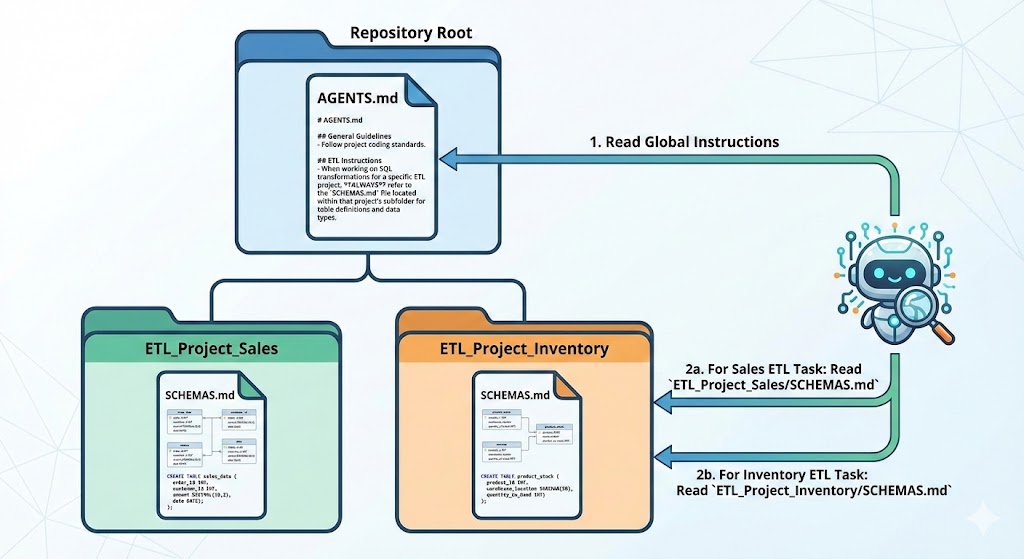
A a quick example: imagine we are working on a daily_revenue mart that aggregates orders data from a raw table.
The AGENTS.md file would contain the instruction to refer to the SCHEMAS.md file like this:
When creating an ETL, always refer to the `SCHEMAS.md` file within a project
to know which table must be used for the transformation and refer to their schemas.
You must always use those schemas as ground truth for writing your ETL logic.
Then in the project_daily_revenue/SCHEMAS.md file, we would have the relevant table definitions:
CREATE TABLE raw.orders (
    order_id VARCHAR,
    amount DECIMAL(10, 2),
    created_at TIMESTAMP
);

CREATE TABLE raw.users (
    user_id VARCHAR,
    date_first_seen TIMESTAMP
);
It is not a far-fetched idea to imagine some command line interface that would help generate these SCHEMAS.md files
by querying the warehouse or data catalog for the relevant tables.
Conclusion
In summary, the key challenge of applying AI in data engineering is the lack of direct
visibility into the data models and the schemas for the thousands of tables most likely residing in
the data warehouse. By introducing project-level schema definitions in dedicated files like SCHEMAS.md,
we can bridge this gap. This approach provides AI tools with the precise context they need to generate accurate
ETL logic, while reducing the risk of hallucinations. I suspect this sort of implementation for data engineering
projects will become a best practice as AI adoption grows in the data space.